How do I change a profile's role on a team?

What roles are there?

A person can have several team affiliations with different roles, but only 1 role on the same team. There are 6 roles:


- Coach: all team functions, can create other coaches and has access to selected club functions


- Assistant: All team functions, can create other coaches and has access to selected club functions


- Team Manager: All team functions, CANNOT create coaches and CANNOT access club functions


- Member: access to his/her own team(s), cannot create/modify activities/other profiles


- Inactive: member not receiving emails, cannot sign up for activities


- Injured: member not receiving emails, cannot sign up for activities
Tað finst einki svar upp á hendan spurningin, ið er relatert til nýtsluna av holdsport frá appini.


Open Club Members and Edit

  1. Click on   Club in the top left corner
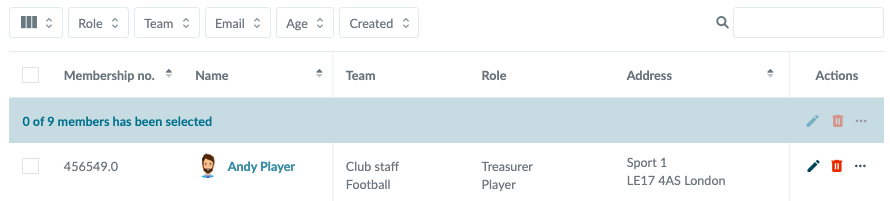
  2. Click on Members
  3. Click on  to the right of the member's name in the Actions column
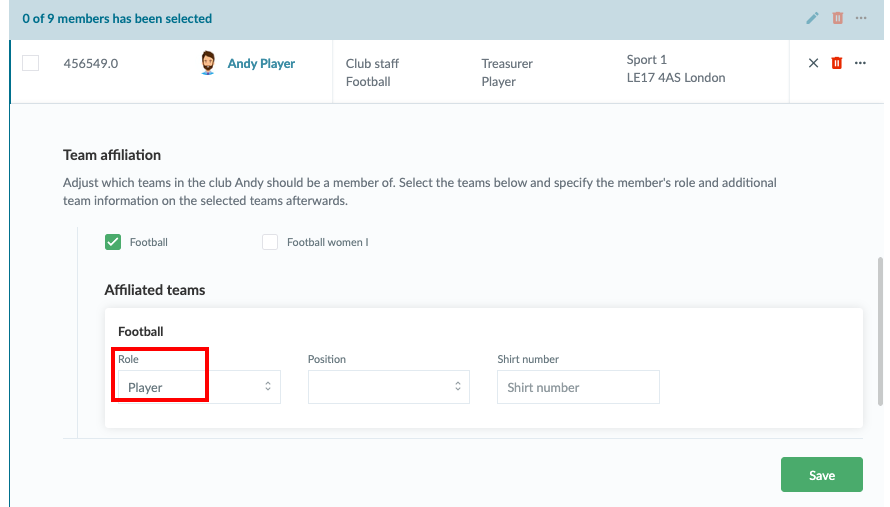
  4. Find the Team affiliation and under that Affiliated teams 
  5. There you can select a role
  6. Finish with the green Save button


Note: If the person wants to keep his/her role on the team, but at the same time have a new role on another team, first add to the other team if he/she is not already on this team. Then you can now change the role on the given team


Var henda greinin brúkilig?
1 av 1 halda hetta var brúkiligt

Klar til at koma í gongd?

Kanna holdsport, ella stovna ein kontu beinanvegin og byrja at umsita títt felag. Tú kanst eisini seta teg í samband við okkum fyri at fáa hjálp við uppsetingini av tínum felag.
Hvat kostar tað?
Hvørjar tørvir hevur títt felag? Basis ella PRO hald?
Prísir
Funku yvirlit
Einki 2 feløg eru eins. Okkara funkur dekka tín tørv.
Funku yvirlit