How do I merge two similar profiles into one?

Why is it a good idea to merge profiles?

- The person can have unlimited roles/team affiliations on one profile


- The person can use the same login for all their team affiliations


- The person can switch between team views/calendar views in their SportMember app in case of multiple team affiliations


- When merging multiple profiles into one profile, remember to click on the profile you want to delete!

- When merging two profiles, one is deleted while all information is transferred to the remaining profile


To merge two profiles into one profile, make sure you access the profile you want to delete (the other profile will be the remaining one).

Note: Two profiles can only be merged if:

  • Both profiles have the same first name
  • Both profiles are affiliated to the same club on SportMember
  • Both profiles are NOT affiliated to other clubs on SportMember
  • Both profiles have at least one email address in common

TIP: If there is a middle name in one profile, edit this first. Then you can be allowed to merge the profiles.

Tað finst einki svar upp á hendan spurningin, ið er relatert til nýtsluna av holdsport frá appini.


Open Members

  1. Click on  Club in the top left corner
  2. Click on Members
  3. Find the profile you want to delete and click on the name
  4. Click on More at the top right
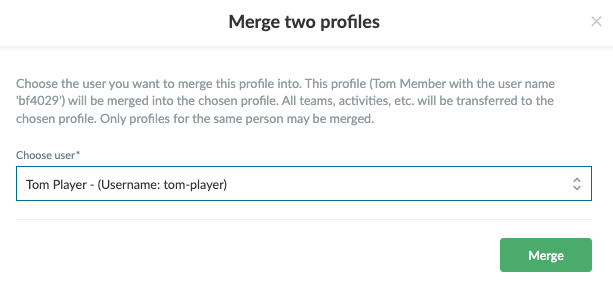
  5. Click on Merge two profiles
  6. Select user and finish with Merge


Var henda greinin brúkilig?
0 av 1 halda hetta var brúkiligt

Klar til at koma í gongd?

Kanna holdsport, ella stovna ein kontu beinanvegin og byrja at umsita títt felag. Tú kanst eisini seta teg í samband við okkum fyri at fáa hjálp við uppsetingini av tínum felag.
Hvat kostar tað?
Hvørjar tørvir hevur títt felag? Basis ella PRO hald?
Prísir
Funku yvirlit
Einki 2 feløg eru eins. Okkara funkur dekka tín tørv.
Funku yvirlit