How do I send emails to the whole club or to specific teams?

Who receives messages from SportMember?

- You can send emails as you wish


- Unlimited number of messages


- All profiles are set up with an email address, so everyone can receive emails

Tað finst einki svar upp á hendan spurningin, ið er relatert til nýtsluna av holdsport frá appini.

Open Email

  1. Click on  Club on the left
  2. Click on  Email

Send email

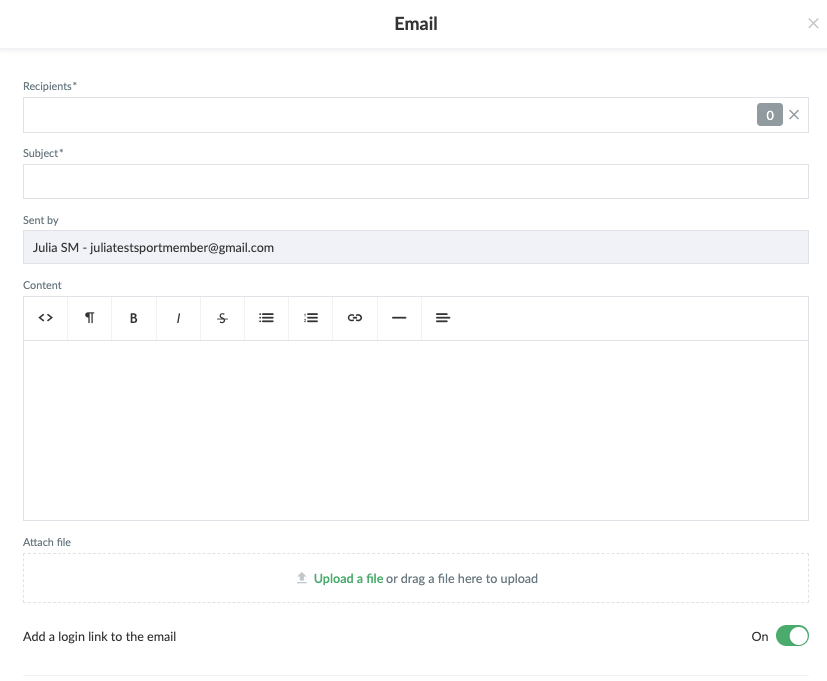
  1. Click on  Email in the left top corner

Here you can:

  • Select recipients, who can be:
    • All coaches in the club
    • Specific departments of the club
    • Specific teams
    • Parents of the members of the club
    • etc.
  • Define a title for the email in the Subject field
  • Choose which email address you want to use as sender (only applicable if you have more than 1 email address on your profile)
  • Define the content of the email
  • Add a login link to each recipient's personal SportMember profile
  • Attach a file to the email if necessary
  • Finish with Send


Var henda greinin brúkilig?
0 av 0 halda hetta var brúkiligt

Klar til at koma í gongd?

Kanna holdsport, ella stovna ein kontu beinanvegin og byrja at umsita títt felag. Tú kanst eisini seta teg í samband við okkum fyri at fáa hjálp við uppsetingini av tínum felag.
Hvat kostar tað?
Hvørjar tørvir hevur títt felag? Basis ella PRO hald?
Prísir
Funku yvirlit
Einki 2 feløg eru eins. Okkara funkur dekka tín tørv.
Funku yvirlit